Hiya: Spam Blocker & Caller ID
- 3.9
- Rating
- 10.00M
- Installs
- Free
- Price

 Analysis by App-foxy
I tried Hiya: Spam Blocker & Caller ID as a communication app with one practical goal: make unknown calls easier to understand and unwanted calls less disruptive. That sounds simple, but caller-identification tools sit between the phone app, the operating system, mobile network, and sometimes visual voicemail. When one part is not configured correctly, the experience can feel unreliable even when the app itself is working normally.
My overall impression is positive, especially for people who regularly receive calls from unfamiliar numbers and want more context before answering. Hiya is free to install, is suitable for Everyone, and comes from Hiya, a developer focused on this particular communication problem. It has reached over ten million installs, with a 4.0 average from around 263 thousand ratings, so it is clearly being used at a substantial scale rather than serving only a narrow group of phone enthusiasts.
The important thing is to approach it as a helper for incoming calls, not as a complete replacement for every phone function. Its value depends on how well your device allows caller identification, spam handling, and voicemail features to work together. I found that understanding those boundaries makes the app much easier to judge fairly.
You May Also Like

 Blood Strike: 2.5 Anniversary
Blood Strike’s Loadouts Turn Every Drop Into a Tactical Gamble
A close look at Blood Strike’s custom loadouts: how fast access to signature weapons reshapes its battle royale rhythm, rewards preparation, and narrows the gap between fights.

 Pandora - Music & Podcasts
Pandora’s Music Is Easy to Start, but Harder to Recover
Pandora’s strength is its low-effort path from a seed to a station. Its weak spot is how much confidence it asks you to place in connection, setup, and quiet recovery.

 8 Ball Pool
 Is Built on Rivalries, Rematches, and Routine
A close look at the rivalries, rematches, shared routines, and unanswered safety questions that turn a quick pool match into a persistent mobile community.

 Samsung Music
’s Quiet Strength Is Playing What You Already Own
Its reach comes less from spectacle than from dependable access to a personal library. That simplicity is both the app’s strongest retention engine and its ceiling.

 AccuWeather: Weather Radar
AccuWeather Review: A Quick, Clear Forecast for Everyday Decisions
For everyday plans, the best forecast is the one you can understand quickly. AccuWeather makes rain timing, radar, and local conditions easy to act on, with a few trade-offs.

 Hill Climb Racing
Why Hill Climb Racing Still Turns Crashes Into One More Run
A tiny car, a bumpy hill and one more upgrade: Hill Climb Racing keeps resurfacing because its simple chaos makes every near-miss feel personal.
More From Our News Desk



Where the experience usually gets stuck
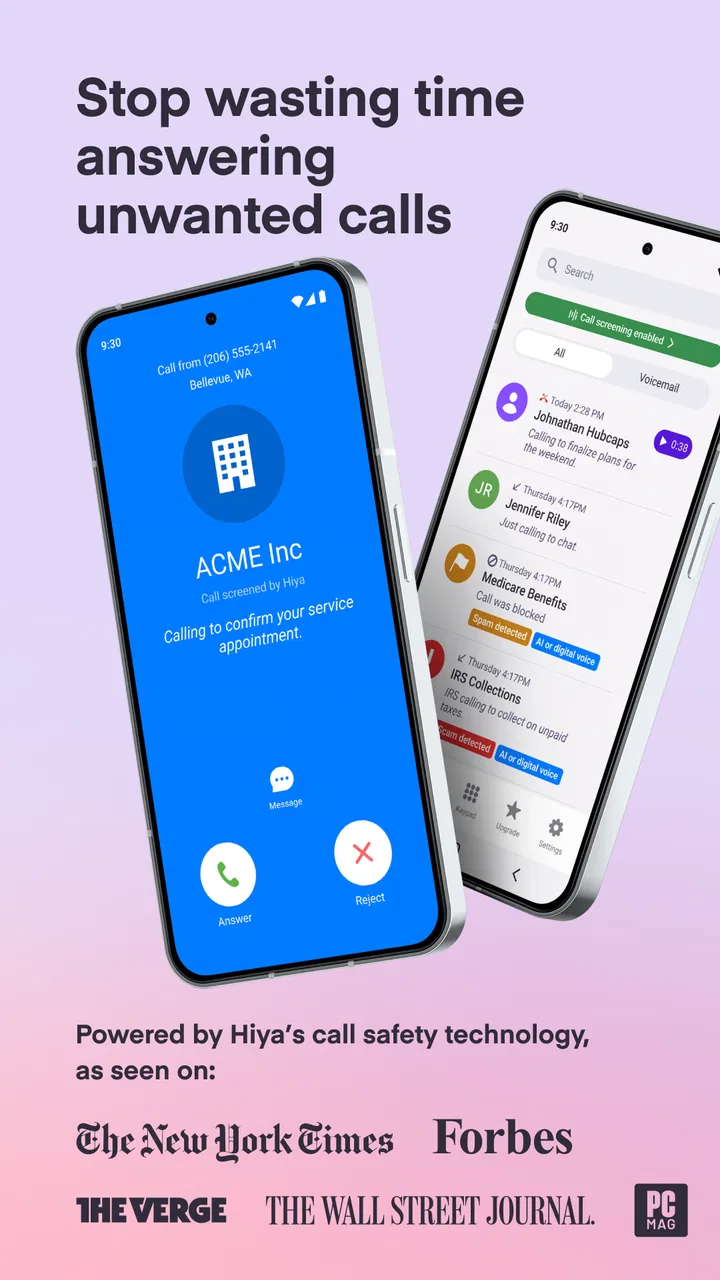
The first point of friction is often the expectation that every unknown caller will be identified instantly. In practice, a number may not have enough information associated with it, or the call may arrive in a way that gives the app limited time to react. A missed identification does not automatically mean the service is broken. It may simply be an unfamiliar personal number, a newly used business number, or a call that the available information cannot classify confidently.
Spam blocking also needs realistic expectations. A blocker can reduce interruptions, but unwanted callers can change numbers, disguise their identity, or use numbers that look local. I would not treat Hiya as a guarantee that every nuisance call disappears. I see it as a filter that can improve the odds of making a safer decision before picking up.
Another common stumbling block is the difference between recognizing a call and stopping it. Caller ID tells me something about an incoming number; blocking changes what happens to the call. Those are related but separate jobs. If identification appears correctly while an unwanted call still rings, that points to a blocking setting or phone-system limitation rather than a failure of recognition.
Visual voicemail can create a similar misunderstanding. The feature is useful when the phone, carrier, and app support the same voicemail route, but voicemail behavior is not controlled by one application alone. A user may see caller information working while voicemail remains unavailable or behaves differently from expected. That is frustrating, but it is also a reminder that carrier support and device compatibility matter here.
I also noticed that people can become confused by duplicate call screens. Depending on the phone model and the selected default communication tools, the system phone app may still handle the incoming call while Hiya contributes identification or filtering information. Seeing the standard call interface does not necessarily mean the app is inactive.
What I check before blaming the app
When an expected result does not appear, I first make the test simple. I use a known number, make one call at a time, and check whether the issue affects caller identification, blocking, or voicemail. Testing all three at once makes it almost impossible to tell which part failed.
I also check that the application is updated to its current version, 14.7.5-11717, and that the phone meets its minimum requirement of Android 6.0. Version details matter because phone integrations can change as operating systems evolve. A device that technically runs an older release may still offer a less predictable experience than a current phone.
Next, I revisit the app's own settings and the phone's call-related settings instead of assuming that installing it completed the setup. If the operating system asks which service should assist with caller identification or spam handling, I read that choice carefully. I do not enable several competing call-screening tools at the same time unless I have a clear reason, because overlapping filters can make results difficult to interpret.
Notifications are another practical checkpoint. If the phone is aggressively limiting background activity, a caller-identification service may not behave consistently. I avoid making broad changes to every battery setting immediately, though. I change only the relevant setting, test again, and then decide whether the adjustment helped. That approach is safer and makes troubleshooting much less confusing.
A setup routine that avoids unnecessary frustration
My preferred setup is gradual. I install the app, open it, read each requested option, and enable only the functions I actually want to use. If my main concern is unknown calls, I begin with identification and review how incoming calls appear. I then test blocking separately rather than activating every option before I understand the basic behavior.
I pay special attention to the phone's default dialer and voicemail arrangement. Hiya can be useful without replacing the familiar phone interface, and I prefer to keep the system's normal call controls understandable. If a setting changes the way calls are displayed, I make a note of it so I know what to reverse later.
For a household phone, I would also explain the difference between a suspicious call and an important unknown call. Blocking too aggressively can be inconvenient when a school, clinic, delivery service, or employer calls from a number that is not saved. I would start conservatively, observe the results, and only tighten the rules after seeing how the app handles legitimate calls in that particular region.
That regional point matters because phone-number patterns and business calling habits vary. A label that helps me interpret one type of caller may not be equally useful for everyone. I treat the information as a prompt to decide, not as proof that I should immediately answer or reject a call.
The app is free, but it also offers in-app purchases ranging from $1.99 to $24.99 per item. I would therefore read any upgrade screen before confirming it and decide whether the additional tools match my needs. Someone who only wants occasional caller context may be satisfied without paying, while a person who receives frequent nuisance calls may consider extra controls more worthwhile.
Recovering a workflow when results look wrong
My first recovery step is to identify the exact symptom. If no caller names or warnings appear, I check the integration and notification path. If a number is identified but still rings, I inspect blocking behavior. If voicemail is the problem, I check the phone and carrier voicemail arrangement before changing unrelated app settings.
I then close and reopen the app, restart the phone, and perform one controlled test. These are basic steps, but they are useful because phone services can remain in an odd state after an update, a settings change, or a temporary network interruption. I avoid repeatedly toggling many options at once; otherwise, I cannot tell which change made the difference.
When a particular number is misclassified, I do not assume that the entire service is inaccurate. I compare the behavior across a few different calls and consider whether the number might be private, recently reassigned, or formatted unusually. A single questionable label is a reason to stay cautious, not a reason to trust every other call blindly.
There is also a useful privacy habit here: I do not save every unknown caller as a contact just to make the phone screen look familiar. Saving a number can make future calls easier to recognize, but it can also create a cluttered address book and give me false confidence. I prefer to save only numbers I have independently verified.
If the app and phone both appear to be functioning but a call still behaves strangely, I repeat the test on a different connection or at a different time. A temporary network issue can affect how quickly information appears. This is especially relevant when a caller's details arrive after the initial ringing screen rather than before it.
When the app is not the cause
Some problems belong to the phone network or device software. Weak reception, a carrier outage, call forwarding, dual-SIM behavior, and manufacturer-specific call management can all affect incoming calls. In those cases, reinstalling Hiya may do nothing except erase settings that were already correct.
Voicemail is the clearest example. If the carrier has not enabled the necessary voicemail service, or if the phone routes messages through a different system, a caller-ID application cannot manufacture that support. I would test ordinary voicemail first, then investigate how visual voicemail is supposed to work on the particular device and plan.
Battery-saving software can also be the real culprit. Some phones restrict background activity more aggressively than others, which can delay notifications or interfere with services that need to respond around the time a call arrives. I would make a targeted adjustment only after confirming that background restrictions correlate with the problem.
Finally, a blocked call may appear to be a failure when the real issue is a mismatch between the app's rules and the phone's call handling. If one system silences a call while another sends it elsewhere, the result may not look exactly like a clean rejection. I find it more useful to check the final call behavior than to focus only on whether the phone rang.
How it fits into everyday calling
A realistic use case is a person who works from home and receives several calls while helping children with homework. The phone rings from an unfamiliar local number. Instead of interrupting everything to answer, the caller information gives that person a chance to decide whether the call deserves attention. If the call is clearly unwanted, blocking can reduce the chance of another interruption from the same source.
Another useful scenario is an older family member who is comfortable answering known contacts but feels uncertain about unfamiliar calls. I would configure Hiya cautiously, keep important contacts saved, and explain that caller information is helpful but not infallible. The goal is not to make decisions invisible; it is to make them easier and safer to consider.
For people who receive business calls, I would use it as an identification aid rather than an automatic gatekeeper. A missed call from a new customer or service provider may look unknown, and aggressive blocking could cost a useful conversation. In that situation, the best workflow is to review the call information, let questionable numbers go to voicemail when appropriate, and return calls through a trusted number rather than relying only on the incoming display.
Compared with the usual phone app alone, Hiya offers a more focused layer for recognizing and handling suspicious callers. The standard dialer remains simpler and usually integrates naturally with the device, but it may not provide the same emphasis on spam awareness. Compared with a carrier's own call-protection tool, Hiya may appeal to someone who wants a dedicated interface and a service centered on caller identity, while the carrier option can be more convenient when it is already built into the phone plan.
I would not recommend stacking several anti-spam applications without a clear plan. Multiple tools can produce duplicated warnings, conflicting decisions, or uncertainty about which service handled a call. Hiya makes the most sense when it has a defined role and the user knows whether the phone's own protection remains active.
Who will appreciate it, and who should skip it
I think Hiya is a good match for people who regularly answer calls from unfamiliar numbers, want help judging interruptions, or need a more deliberate way to manage suspected spam. It is also approachable for users who do not want to study complicated call-management systems. The free entry point makes it easy to evaluate before considering any paid option.
I would be more cautious recommending it to someone who rarely receives unknown calls, already has a carrier solution that works well, or strongly prefers a completely minimal phone setup. The extra layer may not justify the setup time in those cases. It may also be a poor fit for anyone expecting perfect identification or a universal shield against every unwanted caller.
People with unusual phone configurations should plan for more testing. A heavily customized Android interface, multiple SIMs, strict battery controls, or a nonstandard voicemail arrangement can create behavior that is difficult to diagnose from the app alone. The minimum operating-system requirement is Android 6.0, but meeting that requirement does not guarantee identical behavior across every manufacturer.
Privacy-conscious users should make their own decision about which communication features they are comfortable enabling. I would read the setup screens, avoid granting options that do not serve my purpose, and review the result after installation. The right balance is different for someone who wants maximum call context and someone who prefers to keep phone interactions as local and simple as possible.
My practical verdict
After using it as a caller-identification and spam-management tool, I see Hiya as a useful middle ground. It adds meaningful context to unknown calls without requiring me to abandon the familiar phone experience, and it can help reduce the mental effort of deciding whether an unfamiliar number deserves attention.
Its main weakness is not that it lacks value, but that the value depends on a chain of settings and services. Caller ID, blocking, and visual voicemail should be tested as separate functions. When something fails, I would check the phone integration, notifications, battery restrictions, carrier voicemail, and network conditions before concluding that the app is responsible.
The current release is 14.7.5-11717, and the app is rated for Everyone. With its 4.0 average and broad install base, it has enough real-world use to be worth trying, but those figures should not replace a personal test on your own phone. I would install it for a week, begin with moderate settings, and observe whether it improves actual calls rather than merely adding more labels.
My recommendation is straightforward: try it if unknown calls are a recurring annoyance and you are willing to spend a few minutes checking the phone's call settings. Skip it if your existing carrier or dialer already handles the problem cleanly, or if you expect automatic protection with no configuration. The best results come from treating Hiya as a decision aid, not an unquestionable authority. Used that way, it is a practical communication app with a clear everyday purpose and manageable limitations.
FAQs for Hiya: Spam Blocker & Caller ID
01What features does Hiya offer to enhance call management?
Hiya provides advanced call management features, including real-time spam detection, caller ID, and an intuitive interface to block unwanted calls. It identifies unknown numbers and categorizes them to help you decide whether to answer. Additionally, it offers a robust database of spam numbers, ensuring your call experience is seamless and secure.
02How effective is Hiya at identifying spam calls?
Hiya is highly effective in identifying spam calls, thanks to its continuously updated database of spam numbers. The app uses advanced algorithms to detect and block spam and fraudulent calls in real-time. Users report a significant reduction in unwanted calls, making it a reliable tool for maintaining call privacy and security.
03Is Hiya available for both Android and iOS devices?
Yes, Hiya is available for both Android and iOS devices. It can be downloaded from the Google Play Store for Android users and the Apple App Store for iOS users. The app is optimized for both platforms, ensuring a smooth and efficient user experience regardless of the device you use.
04Does Hiya require an internet connection to function?
While Hiya can function without an internet connection for basic features, such as blocking specific numbers, an internet connection is required for real-time spam detection and updates. The app relies on cloud-based technology to provide the most current and comprehensive data for identifying spam and scam calls effectively.
05Are there any privacy concerns with using Hiya?
Hiya prioritizes user privacy and adheres to strict privacy policies. It requires permissions to access your contacts and call history to function effectively, but it ensures that your data is not shared with third parties without consent. Users can review the privacy policy to understand how their data is managed and protected.
Pros
- Effective spam call blocking.
- Accurate caller ID information.
- Customizable block list options.
- User-friendly interface.
- Minimal battery usage.
Cons
- Occasional false positives.
- Premium features require payment.
- Limited features in free version.
- Delayed updates on caller info.
- Ads in free version.

Hiya: Spam Blocker & Caller ID
Gallery